
Spaced repetition Free + Pro
Learning that lasts, built into every course.
Short reviews bring each topic back right before students would forget it, so knowledge sticks long after the lesson ends.
- Free forever plan
- No credit card required
Today’s review
4 cards · about 3 minutes
DAY 9 STREAK
✓
Mon
✓
Tue
✓
Wed
3
Thu
Fri
5
Sat
Sun
How it works
Three steps, no setup headaches.
Students finish a lesson
Key questions from each lesson are added to that student’s review queue automatically.
Reviews arrive on schedule
A few minutes a day. Each correct answer pushes the next review further out.
You see what sticks
Track retention by course and topic, and spot students who are falling behind.
Why it works
Review right before you forget, and it sticks.
Memory fades fast after a lesson. Each short review resets the curve and makes it flatter, so students need fewer reviews over time.
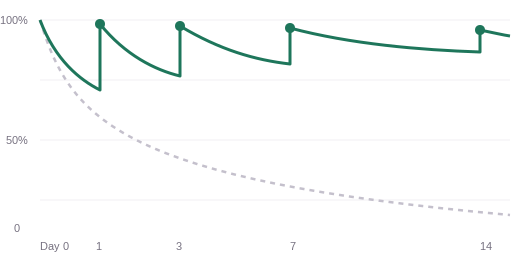
With spaced reviews
Without review
What’s included
Free covers the essentials. Pro plans the week.
Spaced repetition works on the free plan. Pro adds Study plans, which fit upcoming learning around each student’s weekly schedule.
- Automatic review queues
- Daily review reminders
- Streaks and progress
- Retention by topic
- Works on mobile
- Study plans (Pro)
- At-risk alerts (Pro)
- Custom intervals (Pro)
Works well with
Related features
Free + Pro
Course content
Quiz questions, key concepts, missed quick checks and Explain it back answers all feed the review queue.
Learn more
Frequently asked questions
Questions, answered.
Can’t find what you’re looking for?
Do I need to write separate review questions?
No. RootWright uses the quiz questions, key concepts and quick checks already in your lessons. You can also add review-only cards.
What is the difference between spaced repetition and Study plans?
Spaced repetition (Free + Pro) brings students back for short reviews of what they’ve learned. Study plans (Pro) organise upcoming learning around their weekly schedule.
How long does a daily review take?
Usually two to five minutes. Students can pause and pick up later.
Can students turn reminders off?
Yes. Each student chooses reminder times or turns them off from their profile.
Build your learning business
Ready to create a better learning experience?
Create your first course today. Start free, then grow on your terms.
No credit card required · Setup in minutes